
Music Editor Free is an excellent and efficient audio editing and audio production tool for home users. It’s fully loaded to do everything from the simplest recording and editing to the most sophisticated audio processing, restoration, enhancements, and conversions. It has the ability to record audio visually with high quality. What’s more, it allows you to edit the recorded audio file by cutting, copying, etc. and adding audio effects to make recorded music more wonderful. This tutorial will provide the steps of How to Record Audio with Music Editor Free.

How to Record Audio
Step 1. Activate audio recorder window
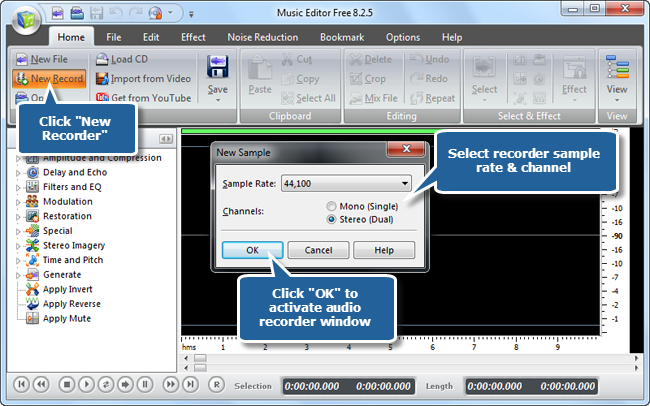
How to Record Audio? Launch Music Editor Free. If you don’t have it, download and install it first Click “New Record” to select recorder sample rate & channel and click “OK” to activate audio recorder window.
Step 2. Select a suitable recording device & recording mixer
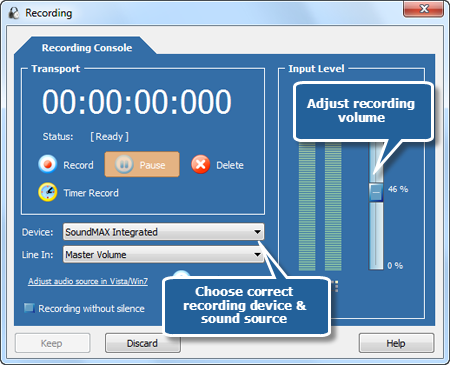
Choose a suitable recording device and recording mixer from “Stereo Mix”, “CD volume” “Line In” and “Mic Volume”. You can adjust the volume and balance.
Step 3. Record Audio
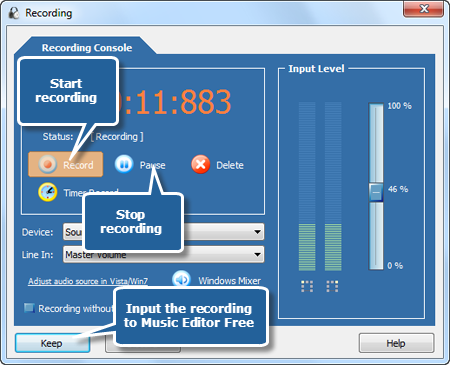
Click “Record” button to start recording. When recording is finished, the recorded audio file will automatically be input the waveform window. Now,you can save the recording as an audio file. Choose an output format, preset the output quality or specify the configuration parameters.
Step 4. Save the changes
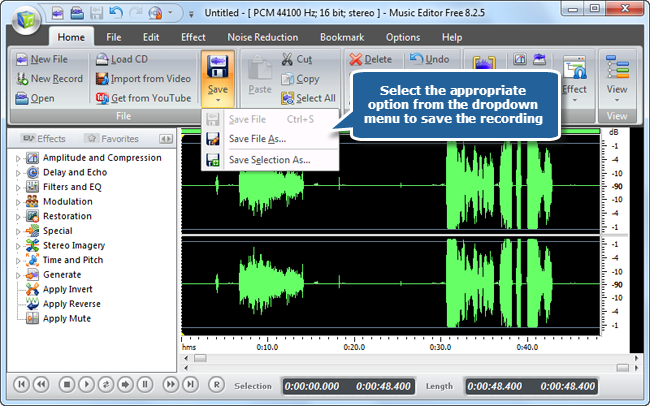
Now click the “Save” button if you would like to change your source file. You can also click the black arrow under the “Save” button to select the necessary option:
- Save File to save all the changes to the source file;
- Save File As… to save the edited audio track with a different file name and/or location;
- Save Selection As… to save just the highlighted selection to a file.
Now you’ve understood How to Record Audio with our free music editor software.
How to Record Audio Differently?
How to Record Audio with Windows Built-in Sound Recorder
Make sure that a microphone is installed on your Windows PC. If not, you need to connect an external mic. Click “Start – Control Panel” and find “Hardware and Sound”, then select “Manage Audio Devices”. Go to “Recording” tab and verify whether your microphone is listed. Click on “Start” and input “Sound Recorder” in the search box, then, Click “Sound Recorder” in the result list. Now, click on “Start Recording” and play the sound you want to record. When it’s done, click “Stop Recording”. Click “File – Save As” to save the recording in the folder you specified.

Conclusion
All in all, Music Editor Free is not designed for complex music production. Users of any level can make full use of it with great ease. For those who are ready to take a step to find a powerful yet straightforward audio editing program, Music Editor Free offers tremendous power and complete flexibility, which has earned it the top spot among audio editors on the market.