
ID3 tagging is the process of labeling your MP3 files so that you will be clear of all of the music pertinent information for convenient sharing. Stop messing up your audio files – add some ID3 information to them with Music Editor Free to easily manage your songs. This post will focus on How to Edit ID3 Information of your MP3 files.

How to Edit ID3 Information
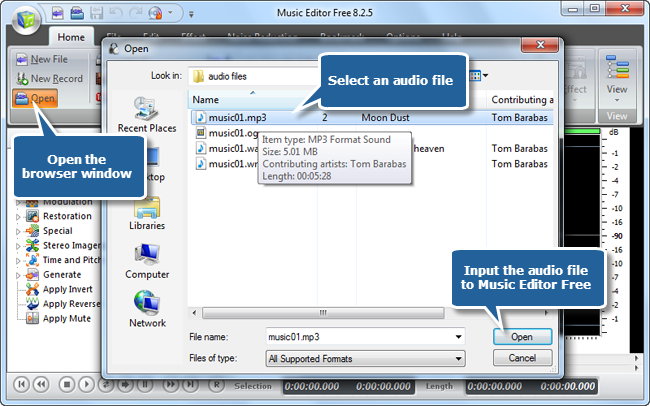
Step 1. Input an audio file
To edit ID3 information, launch Music Editor Free, click “Open” to input an audio file to the program.
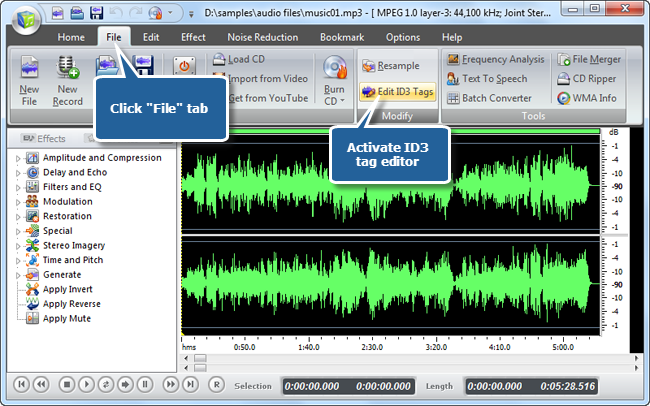
Step 2. Activate ID3 tag editor
Click “File -> Edit ID3 Tags” to activate the tag editor window.
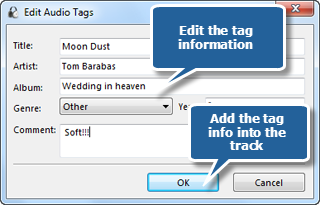
Step 3. Edit ID3 information
You can enter various specification such as title, artist, album, genre, comment and year. Click “OK” and immediately you get the ID3 information added.
Other Ways to Edit Your ID3 Tags Easily
Below we list some easy steps to edit ID3 information on the most commonly used media players for managing your audio files with ease.
In your Windows Media Player, right-click your audio file and choose “Edit” to edit the song’s title. In “Advanced Tag Editor”, you can edit song’s writer and other information. If you want to edit music info on your Mac, just use iTunes. Right-click or ctrl+click on your song and choose “Get Info” or you can go to “Info” tab to edit your ID3 tags. You can also edit ID3 tag in Winamp, similarly, right click on the audio file and choose “View File Info”.
Conclusion
If you’re searching for a way to spruce up your old recordings, add some reverb or pitch-shifts, you will create a great audio file in no time. Music Editor Free has tons of tweaks to help you find the best sound. It is a program designed to make the process of music editing as simple as possible, while remaining a powerful piece of program. Whether you are a novice to audio editing, or you are a professional editor, you need to give it a look.